
What source control strategy is right for my team?
A comparative study on Source control management strategies and their impact on team dynamics and flow of work

Through this post I reflect on my experiences with various source control management strategies that I have either worked with directly, or have observed teams practising. My aim is to present a balanced assessment of these strategies, examining their effectiveness and common challenges.
When I imagine source control management in the context of agility, a goal that I find compelling is ability to release valuable features frequently with minimal effort and good quality.
I'd broaden this goal to encompass the following focus areas
Focus areas
Release management
How frequently can code be released?
Flexibility to selectively release features
Intended features must go in
Unintended features shouldn’t go in (If they do, they shouldn’t break anything)
If release has a bug, how can it be fixed quickly?
Team collaboration
Does the whole team have visibility on latest developments and changes in the code repository?
What is the effort required to collaboratively develop and integrate code?
Code quality
How to ensure code is well tested and free of vulnerabilities?
Is it easy to read, understand and maintain, in short, clean?
These considerations are further influenced by following factors
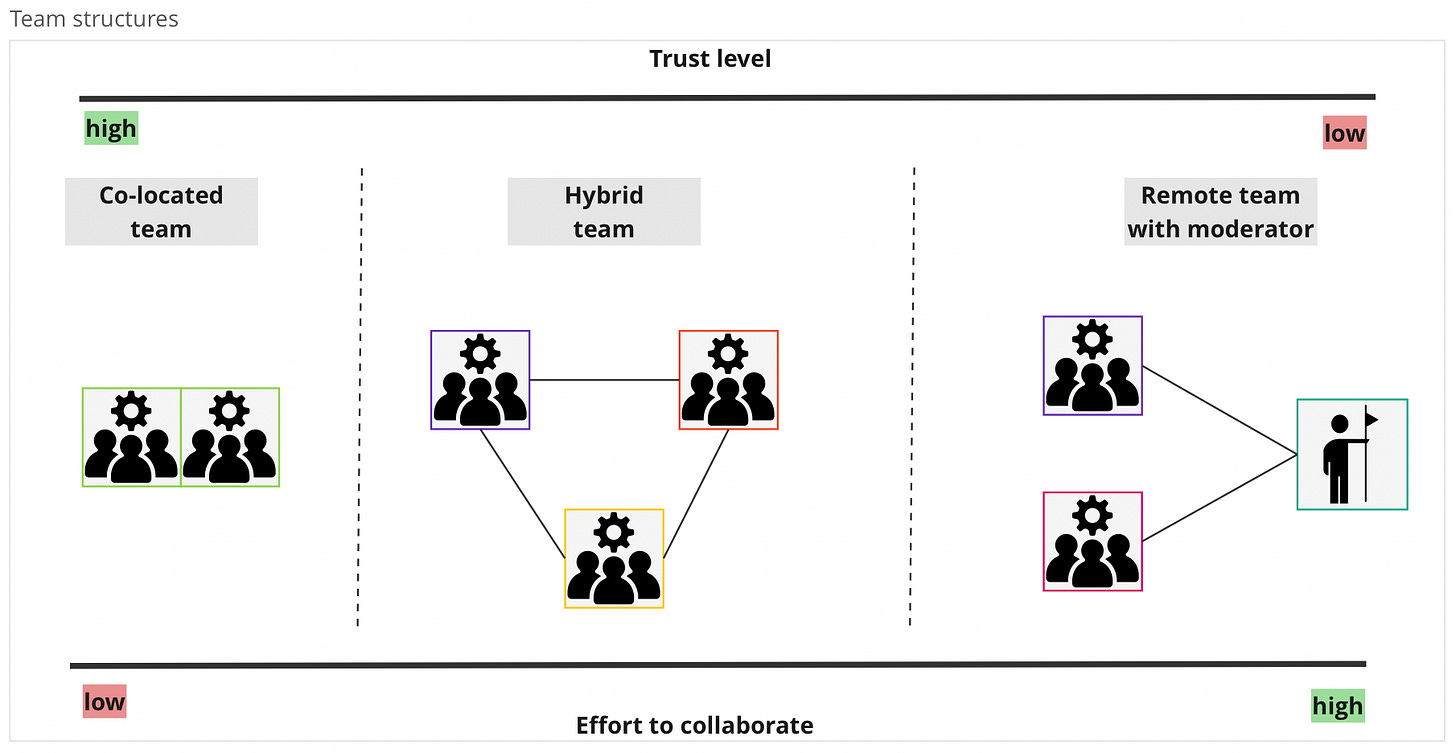
Team structure - Teams could be co-located, hybrid at multiple locations, or totally remote coordinating through a tech lead/moderator
As shown in the figure below, in co-located teams, effort to collaborate is generally low and trust levels are high as compared to other team structures. This influences how source code is managed.
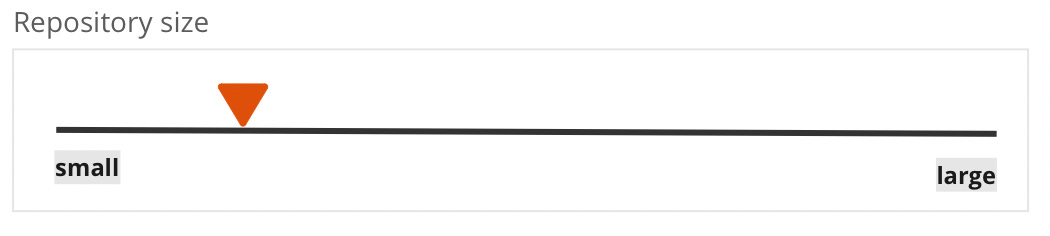
Code repository size - The repository could be imagined on a scale from small and specific codebase (eg. a micro-service), to a large repository (eg. a legacy monolithic app or may be a mono-repo)
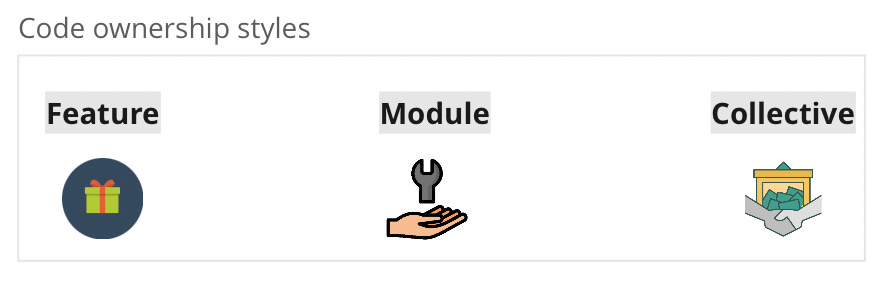
Code ownership style - Ownership represents how team organises itself around code. It could be by defined as feature ownership where individual member/sub-team focuses on building specific features, module ownership where individual member/sub-team focuses on a given module, or collective ownership, where everyone can work on any aspect of code
Source management workflows
When working together on a code repository, team needs a shared understanding of how tasks can be done independently and how the resulting work should be merged when finished.
Different source control management workflows share some common concepts for work management, including:
Branch: Creating a new pathway from the original for isolated development or bug fixes. In Git, this is achieved by establishing a new pointer from the last commit.
Merge: Combining changes back into the original path once development is completed.
Release: Deploying to production from a specified commit state.
Cherry-pick: Merging selectively chosen commits with a branch.
Pull request: Initiating a request to merge changes into a branch.
Popular workflow strategies
Git-flow
Git-flow advocates multiple branches with specific role for each branch. Below is a quick summary. For detailed description, refer to the Git-flow author’s blog here.
Master: Production-ready state; all releases are intended to originate here with an option for auto-deployment.
Develop: Active development branch; merges to
Mastersignify potential release candidates.Release (Optional): Created from
Developbranch for configurations, sanity testing and stabilising the release. Merged with Master and Develop post-fixes.Hot-fix (Optional): For immediate bug fixes in production; branched from the latest
Masterrelease tag.Feature (Optional): For isolated feature development; merged back into
Developupon completion. There could be one or more active feature branches
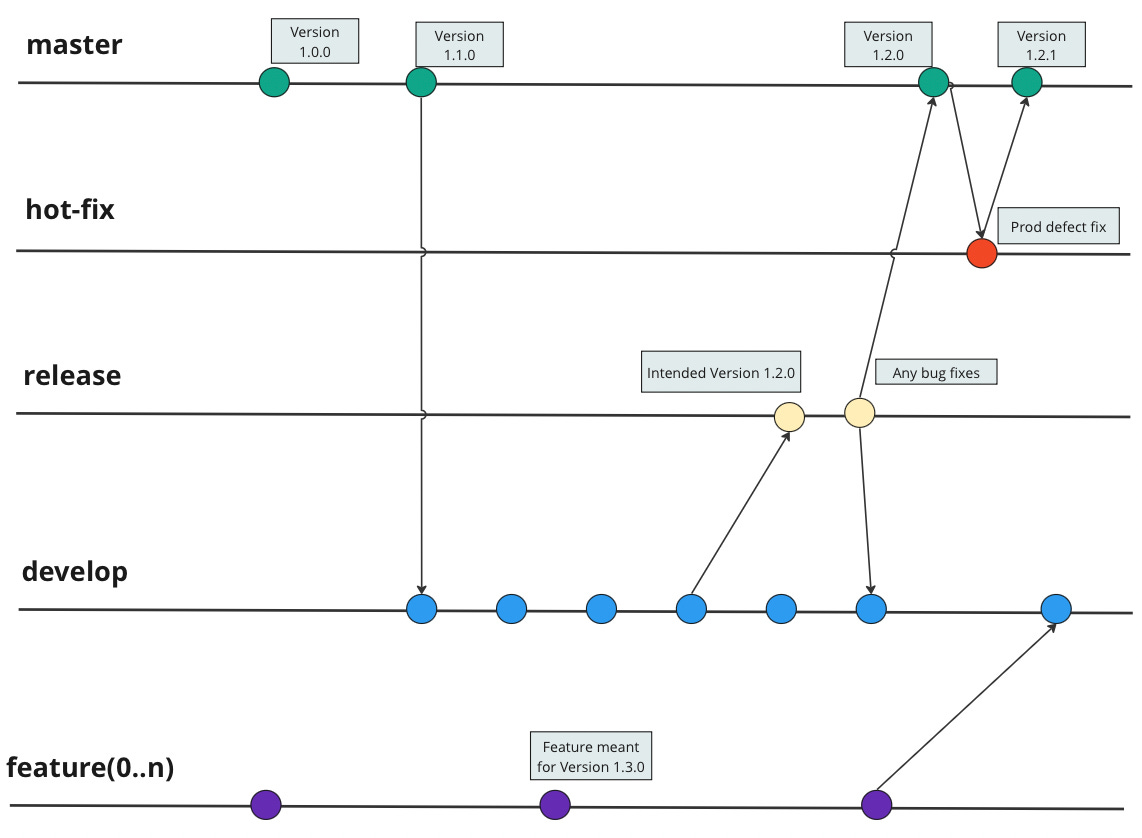
Git-flow is a highly popular pattern, but it is not without its pitfalls. Let us examine it through the considerations and factors discussed earlier.
Git-flow focuses on keeping
Masterclean for release, with all development, testing and reviews designated to other branchesFeature branching allows parallel development of multiple features.
With multiple active branches, it’s usual for developers to cherry pick selected commits for release
However, concerning the earlier-stated goal of ability to release valuable features frequently with minimal effort and good quality, these features also pose potential issues.
It often results in the persistence of long-lived branches, holding onto them until feature development is complete, thereby delaying the feedback loop within the team.
With multiple active branches, not everyone on the team is aware of the current system state, as parallel states exist simultaneously.
This complexity in branch management also introduces challenges in release planning, with additional effort for selective merging and conflict resolution.
The occurrence of large commits leads to substantial pull requests, posing challenges for comprehensive human review and potentially resulting in either a prolonged code review process or a superficial review with oversight.
Deferred commits may contribute to merge conflicts, as differences are discovered late in the process, leading to significant effort to resolve.
It’s easier to overlook commits intended for cherry-picking, introducing a potential challenge in the process.
As I gather from the Git-flow author’s notes, when developed, its primary emphasis was on handling large releases and, occasionally, managing multiple active production versions of a product simultaneously. Naturally, the workflow appears a misfit for the need of frequent releases.
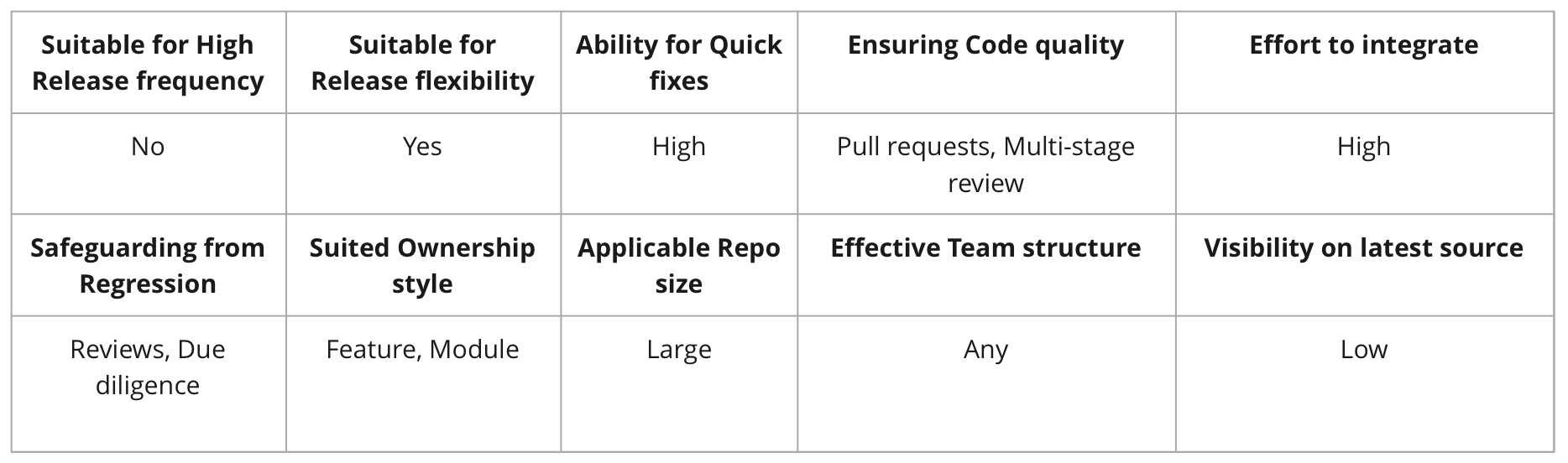
Here is my assessment of Git-flow on various factors shared above.
Environment branching
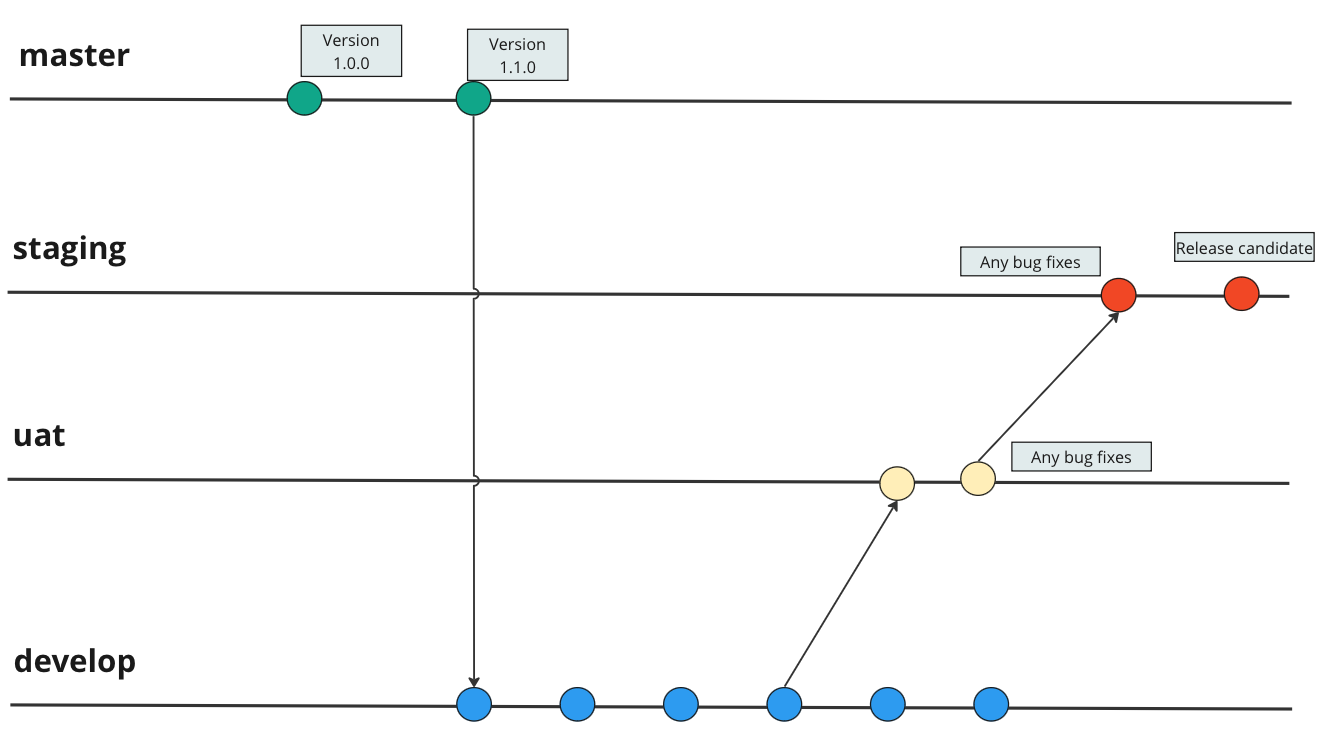
Another pattern of multi branching strategy that I have found is Environment branching, that focuses on branching based on Environments (DEV, UAT, STAGING).
And mostly the reason are configuration settings embedded in the codebase like DB connections, API links, Keys.
Each environment is like a stage in refining the release, with different levels of reviews, and testing. For instance, Development branch is merged with UAT based on pull request approval. UAT is merged to staging on user and QA sign-off. Each stage of release refinement takes its own time, as new work on Development branch carries on.
In some cases, the releases are done directly from staging branch, and subsequently master, develop and UAT branches are updated with current release version.
There are some obvious pitfalls in this strategy
Given that different environment branches are primarily driven by environment configuration settings, there's a risk of overlooking certain parameters that might inadvertently slip into production, leading to unintended behaviour—a more common occurrence than one might anticipate.
Continuous development and isolated patching may introduce the likelihood of branches falling out of sync, presenting challenges in reconciling commits across all branches.
De-coupling environment configuration from application helps to eliminate need of Environment branches.
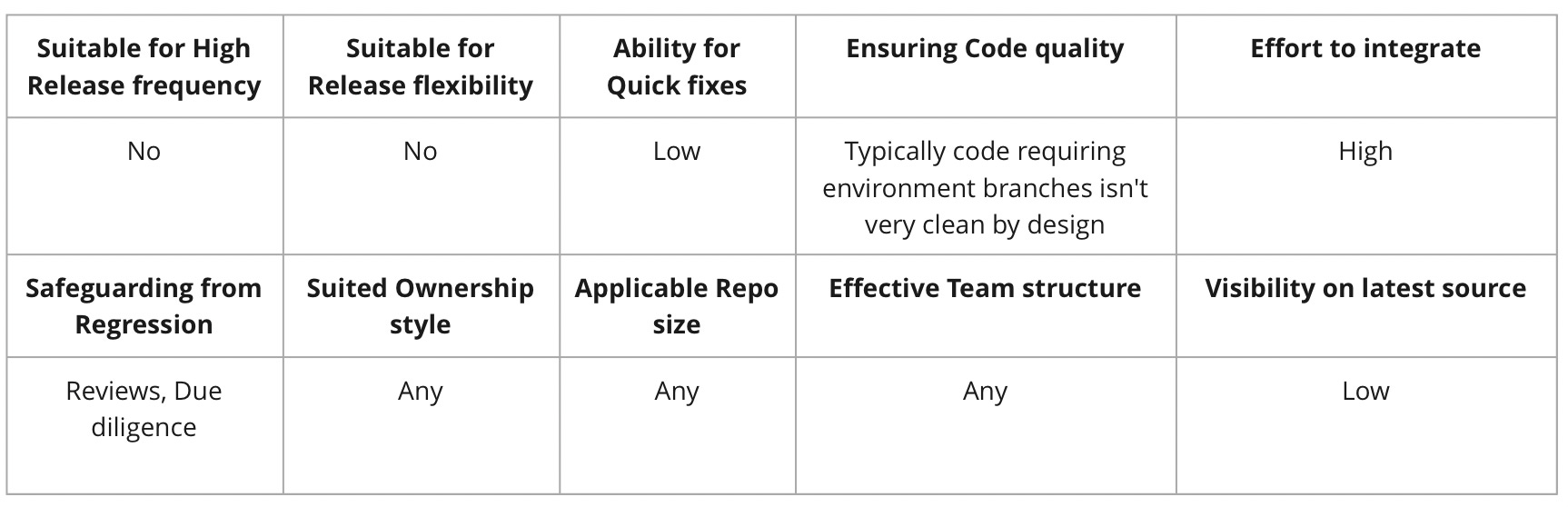
Here is my assessment of Environment branching on various factors.
Trunk based development (or Continuous integration)
Lastly, when it comes to ability to frequently release, it is often used interchangeably with the ability to continuously integrate and deliver.
With this strategy, developers collaborate on a single branch called the "trunk" or "main" branch. Developers work on small, incremental changes and integrate them directly into the main branch at-least once a day. The goal is to keep the main branch in a consistently deployable state at all times.
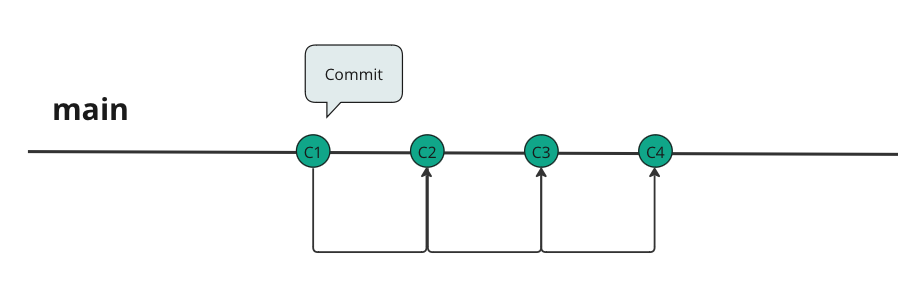
For large-scale development, it helps to create short-lived(1-2 days) branches that can be merged back to main branch frequently.
With small, incremental changes, the focus of Trunk based development is
To avoid large merge conflicts
To provide a unified and near-latest view of source code for all developers
Avoid regression by keeping trunk (or main) as the single source of truth, and safeguard from isolated branch patching
Early detection of any issues
For large changes that is likely to take a long time, and when incremental release is not desirable, the strategy advocates usage of feature flags (ability to enable/disable a feature) and branching by abstraction(ability to abstract usage of dependencies, and gradual replacement).
Any production bugs are expected to be fixed directly in trunk, so that they can run through necessary integration validation, and are subsequently tagged for release.
However, there are a few considerations to effectively use trunk based development and pitfalls if not adopted well
A crucial aspect of successful Trunk-Based Development is the commitment to keeping the main branch clean. This necessitates an ongoing emphasis on code quality achieved through rigorous automated tests and peer reviews, with pair programming being an optimal choice.
It requires maturity within the team to practices pre commit builds to find any issues, well understood and agreed coding practices, and continuous testing.
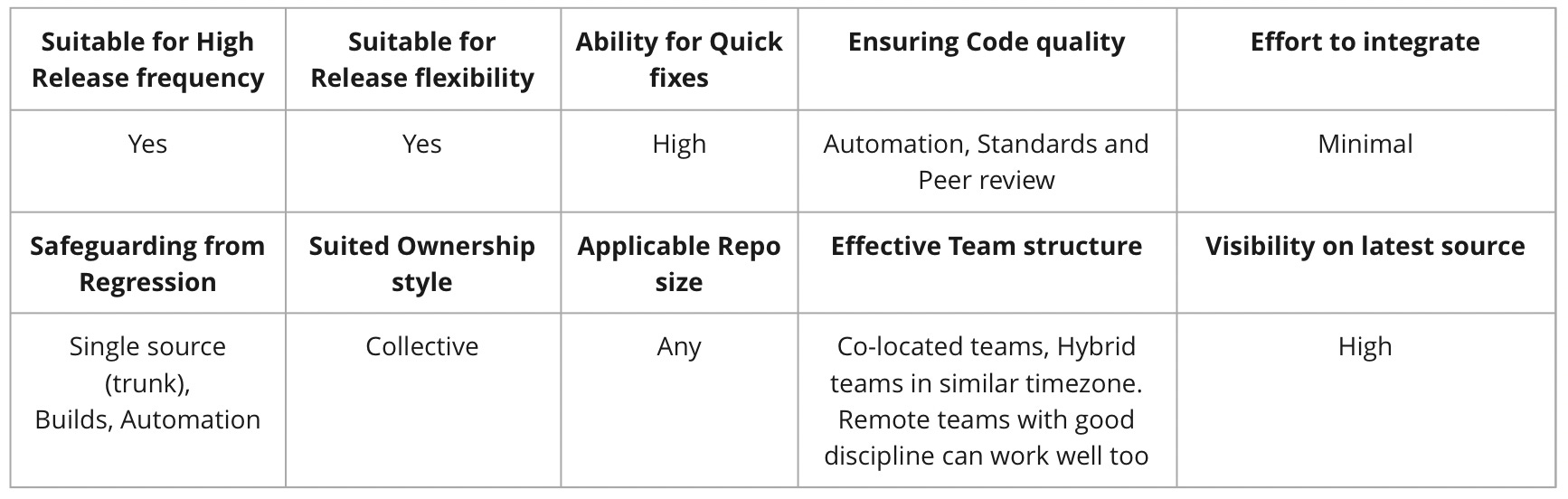
Here is my assessment of Trunk based development on various factors.
Other strategies
Github flow
Github flow appears to be a lightweight strategy, focused towards ability to continuously integrate and frequently deploy. It advocates only two kind of branches.
Master: Production-ready state; all releases originate here.
Feature: For isolated feature development; merged back into Develop upon completion. There could be one or more active feature branches.
The features are merged back through pull requests subject to peer review, any changes and approval.
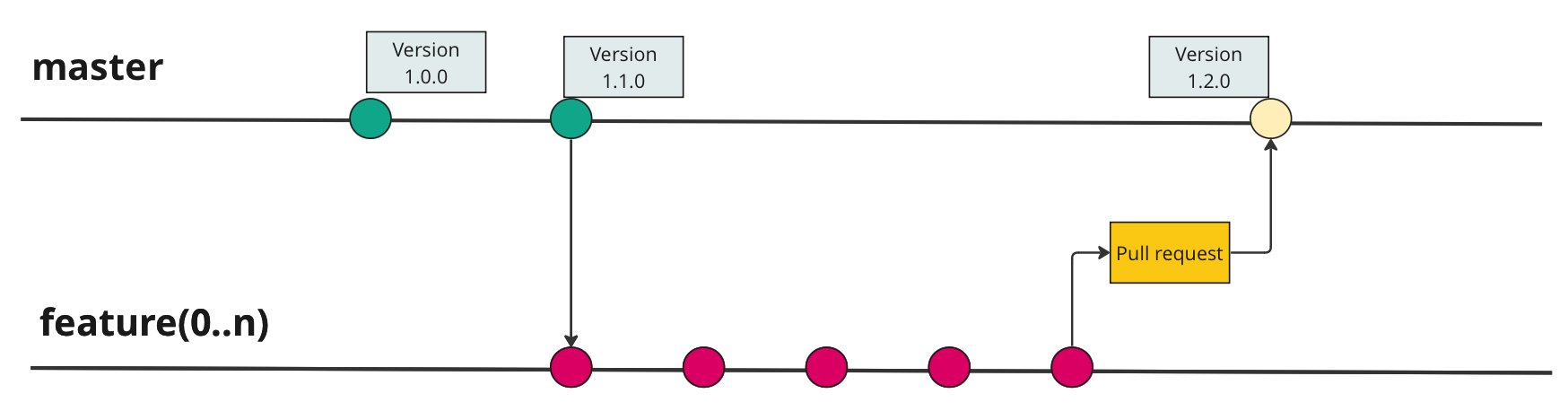
Upon merge, the feature branch is meant to be dissolved.
Conclusion
In summary, selecting the right source management strategy is a nuanced decision that hinges on the unique needs and dynamics of your team and project. While Git-flow's structured branching model appears advantageous for larger, feature-heavy releases, it introduces complexities in source code management, particularly when aiming for frequent releases. Conversely, Trunk-Based Development, with its emphasis on small, frequent changes, proves to be an optimal choice for teams aiming at swift releases and streamlined collaboration.